The Settings section lets you manage basic profile information, configure workspaces, and manage subscriptions.
How to open settings
To open the settings page, click the icon with your initials at the very bottom of the left sidebar and select the Settings section.
This is your personal space that gathers the key information about you as a platform user.
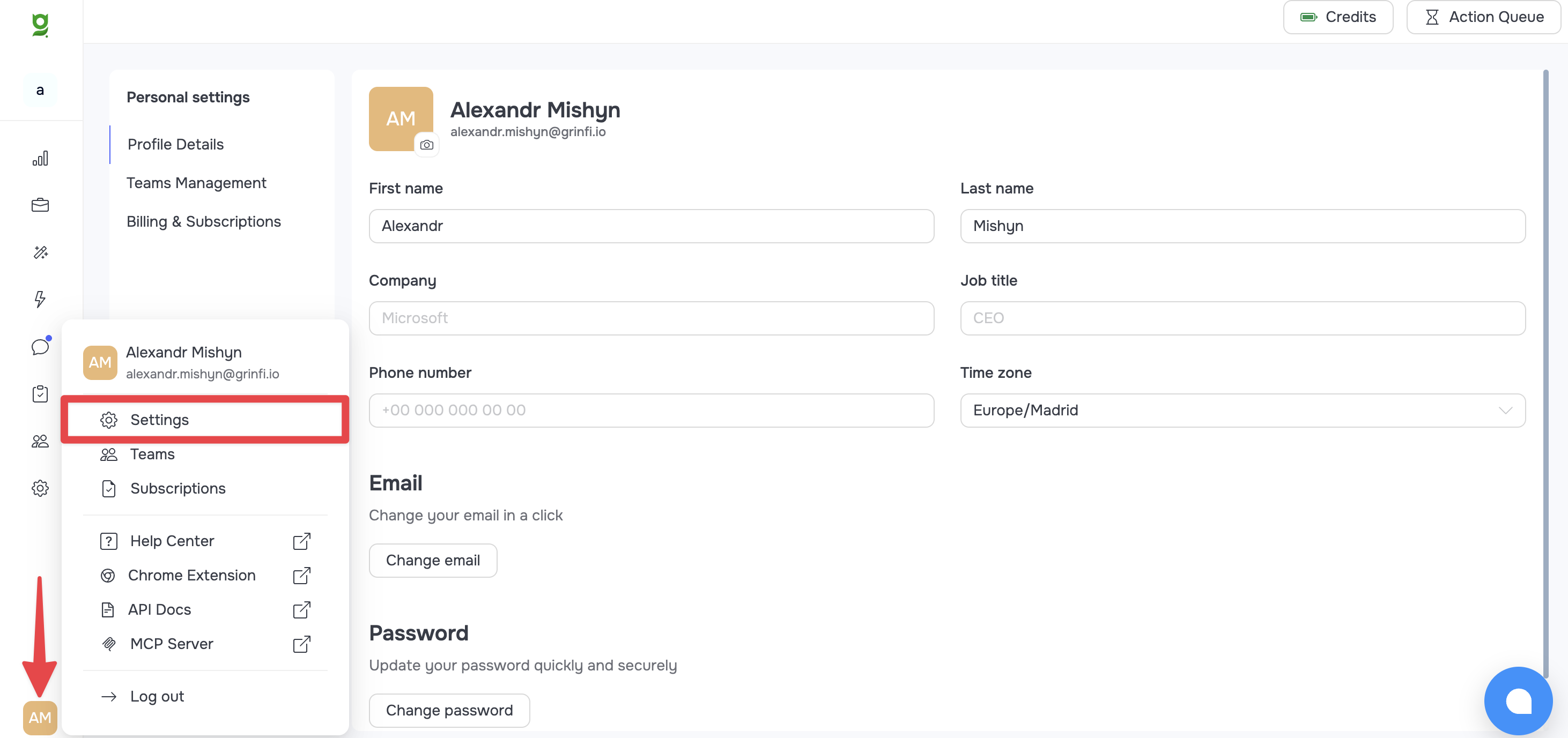
Profile Details tab
In this section, you can update your personal and contact details that the system uses.
You can change or add the following information:
-
First name / Last name: Your first and last name.
-
Company: Your company name.
-
Job title: Your position.
-
Phone number: Your contact phone number.
-
Time zone: Your current time zone. This is an important setting, because it can affect how time is displayed in the system (for example, when creating manual tasks).
This section also contains two important buttons for your account security:
-
Change email: Lets you change the email address your Grinfi account is registered to.
-
Change password: Lets you update your current password for logging in to the system.
Other tabs in the Settings section
In the left navigation panel of the Settings section (Personal settings), two more tabs are available for management:
Teams Management: This section shows all the workspaces/teams you have access to or that you created. You can see which of them are active and switch between them quickly.
Billing & Subscriptions: This tab is for managing your pricing plan.
For more details on how plans work and how to manage subscriptions, read the related articles: [Grinfi Pricing Plans Overview] and [Subscription Management].