By default, every workspace in Grinfi has a certain number of system credits allocated for using artificial intelligence, which depends on your current plan. These credits let you start using the platform's AI features right away.
However, so that you don't depend on the platform's system limits, you can connect your own LLM token to your account. In this case, Grinfi will not apply any restrictions on the number of requests - all further limits and pricing will depend solely on your third-party AI provider.
Your own token can be used for these AI tools:
How to connect your own LLM token
To add your integration, follow a few simple steps:
-
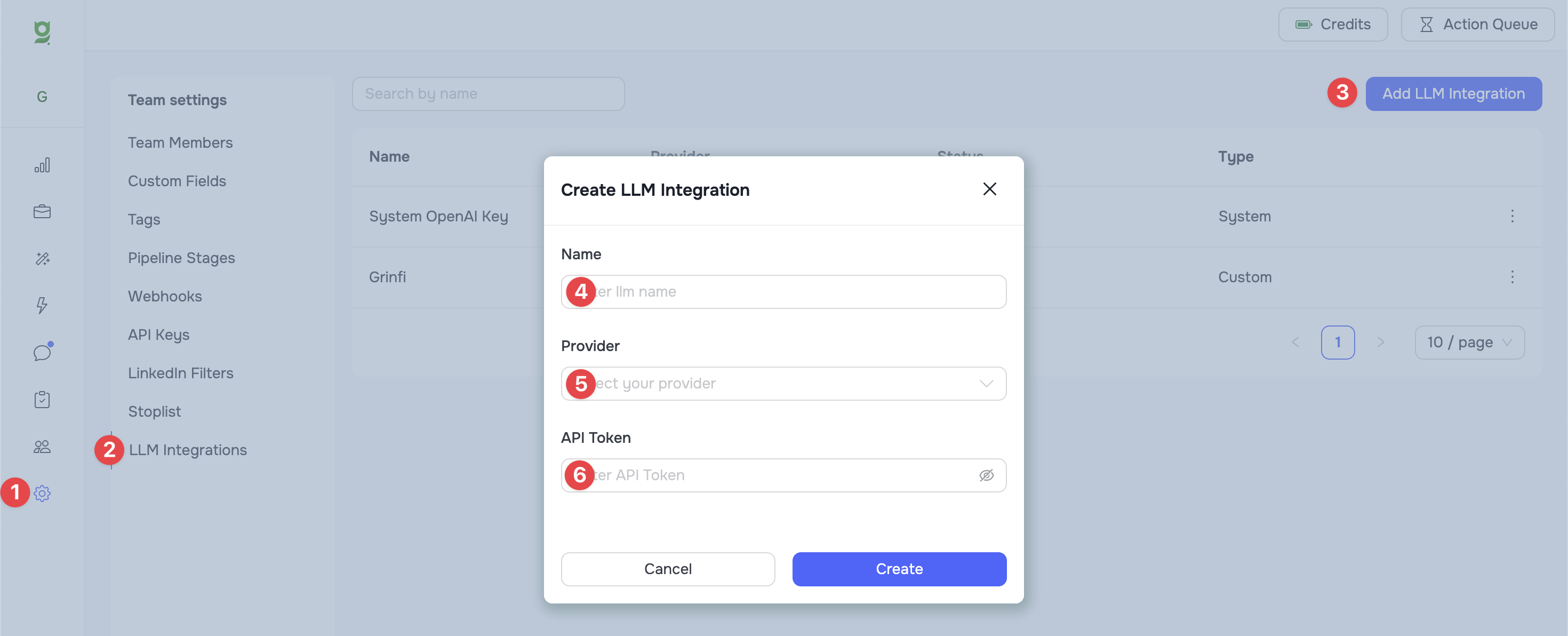
Go to the general settings section Settings (1).
-
In the menu on the left, select the LLM Integrations (2) tab.
-
Click the Add LLM Integration (3) button in the top right corner of the screen.
In the settings modal window:
-
Name (4): Enter a clear name for your token to easily identify it in the system.
-
Provider (5): Select your AI provider from the dropdown list.
-
API Token (6): Paste the access key (API token) generated on your provider's side.
-
Click the Create button to save the integration.
Once connected successfully, this token becomes available for selection when creating or editing your AI Templates or AI Variables. Just select it from the list of providers instead of the system one, so that all requests are processed through your own integration.